

operations software
One click
automated routing
Pallets, doors and trailers planned first. Then every route, built for you in one click.
See it run
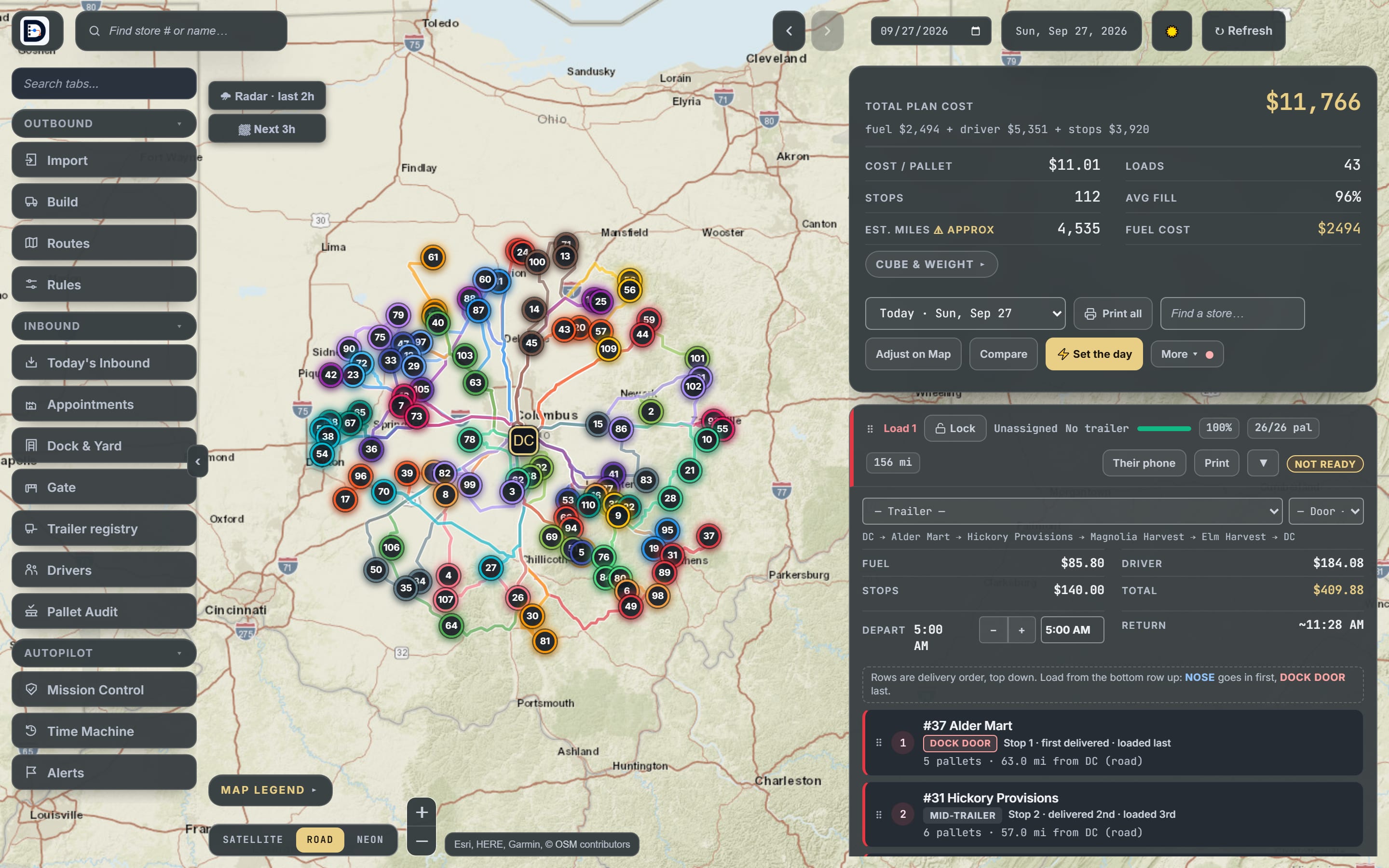
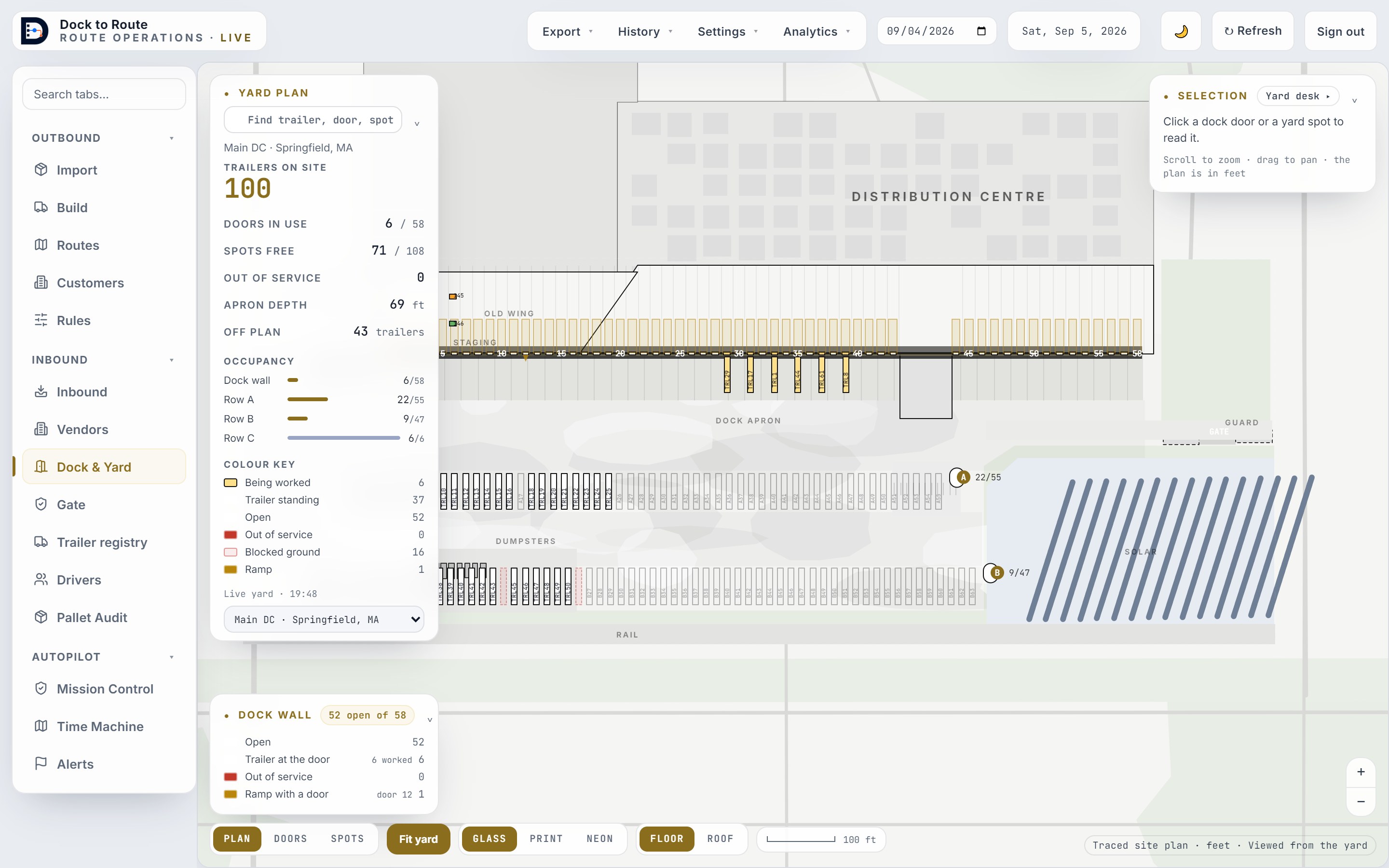
Two screens run the day. The dock builds the loads and the doors. The routes take them out.
The free route teardown
Your real day, routed by us. Free, done personally by the founder. No signup, no card, no slide deck.
- Send yesterday's sheet. Customers, addresses, and pallets or cube per stop. A photo of the printout is fine.
- We route tomorrow. Every load built, with its miles, its fill, and what it costs. Usually inside a day.
- You compare. Line it up against what actually ran. If your day already beats ours, we'll tell you that too.
Route optimization that follows your rules, built in one click, editable all day.
Running 30 trucks right shouldn't require heroics at 3 AM. That's the whole reason this product exists.
Don't take our word for it. Run the real thing.
Not a video and not a mock-up: the actual product, open in a sandbox with fourteen invented stores on a real map. Load a day, hit Build Routes, and read the same numbers a dispatcher reads. Nothing to install, nothing to sign up for.
One system for the whole building, not just the routes.
Dock scheduling, inbound receiving, yard management, and delivery management under one roof. It started as a load builder. It now runs the loop: the vendor books their own dock appointment, the door gets picked, the yard gets moved, the day gets built, the driver reports back, your customer watches their own stop arrive, the credit desk settles what came back, and the evening tells you what it cost. Every screen below is built and running. We will show you each one live on the demo.
- Positions, cube, weight, and temp zones respected together
- Live edits all day, an add-on lands on the cheapest legal truck
- Weather-layered drive times, so you know when to ship
- Backhauls: which truck swings by which vendor on the way home
- Import wizard reads your spreadsheets and palletizes the day
- Hard constraints it can never break, never pair, direct delivery, equipment, windows, stop and mileage caps
- Preferences it follows when the day allows, and tells you when it couldn't
- Every rule written in plain English before you save it
- A rule for one date only, or several windows in one rule, the lunch closure
- Contradictory rules are surfaced, never silently dropped
- Doors, staging lanes, and load order assigned automatically
- Every door carries a direction and its own hours, shipping, receiving, or both
- Trailer assignment checked against cube, weight, and temp
- The load & routing sheet your dock already reads, generated
- Pallet audit: import, merge, and reconcile what actually shipped
- Vendor portal shows real open slots and a dock door
- Booking policy you set per vendor: windows, allowed days, and daily caps
- Doors assigned by where the freight is headed after it lands
- Unload times learned per vendor from your own stamped receipts
- Late, overdue, and no-show vendors surfaced with a scorecard
- Gate check-in and check-out, to a door or to a yard spot
- One server-true location per trailer, with an append-only history of every move
- Every visit can leave with a Turn Statement: gate in, gate out, the math, signed by the driver
- Yard driver gets a phone page with just their moves
- Scan a barcode with the phone camera, or type it in
- Deliveries, shorts, and refusals flow back to dispatch
- Every exception carries a coded reason, a disposition, and the receiver's counter-signature
- Keeps working through dead zones and syncs when coverage returns
- Real departure times feed the plan instead of a guess
- Rotating a driver's link instantly revokes the old one
- A no-login tracking link per stop, texted to the receiver
- After the stop it becomes the proof page: who signed, the photos, the temperature at the door
- Driver call-ahead from their phone, without handing out anyone's number
- Credit queue: the office settles a short or refusal in about a minute
- The adjusted delivery note follows automatically
- The normal week as a grid: who owns which run, and from what hour
- Day-off requests, and the coverage hole they leave behind
- A call-out goes out as a one-button offer, first driver to accept takes the run
- Timecards built from the phones themselves: first report, last report, span
- Reported hours shown with their source and age, never merged into one number (your ELD remains the record of duty status)
- One readiness truth every screen agrees on; unknowns stay unknown
- Ranked next actions with the reason and the dollars attached
- Friction ledger charges lost minutes to a cause you can act on
- A drift timeline that answers who is drowning, not just who is out
- Evening debrief separates a bad plan from an unlucky day
- It learns your real stop and unload times from your own days, and every learned number shows how many visits stand behind it
- Autopilot earns autonomy one decision at a time: it suggests, you decide, and what you correct it learns from
- Seven exportable reports: shift summary, time at the door, shorts & credits, carrier detention, reefer readings, spotter scorecard, and the raw event log
Also included: time machine replay of any past day, a full audit trail of who changed what, per-load cost and cost-per-pallet economics, a weather command center, carrier appointments and detention scoring, a gate kiosk your guard can run from a laminated QR, diesel priced from the market rather than typed, print packs, and spreadsheet export of anything on screen. All of it comes in the one flat price of the everything plan.
The full list: everything the software does
- One click builds the day: pallets, cube, weight and temperature zones respected together
- Your own rules enforced: delivery windows, never-split and never-together customers, customers that ship alone, stop and hour limits
- Live edits all day; an add-on order lands on the cheapest legal truck and the other loads stay put
- Locked loads the optimizer never touches
- Truck-legal road miles when truck routing is configured, labelled straight-line miles when not
- Backhauls and vendor pickups on the way home
- Weather-aware drive times and a forecast read against the day
- An automatic draft of the day as soon as the order file arrives, waiting for a person to open it
- Import wizard for customer lists and order files (CSV, Excel), saved column layouts, and AI that reads odd layouts, PDFs and photos
- Route sheets, load sheets and print packs your dock already reads
- Per-load cost and cost per pallet
- Your dock drawn as it is: doors, walls, directions and hours
- Doors assigned to loads and to inbound trucks, with door outages
- Staging lanes and load order planned before the first trailer backs in
- Floor chat for the dock lead: "load 9 nose", "door 4 ready", change requests to dispatch
- Check the load: photograph a trailer before the doors close and it flags a pallet that belongs on another load
- Pallet audit: count what actually shipped against the plan
- Gate check-in and check-out to a door or a yard spot, with a self check-in QR sign for unmanned gates
- One true location per trailer and a history of every move
- A yard driver phone page with just their moves
- Yard walks, seal checks and reefer temperature readings
- Detention clocks, and a Turn Statement per visit the driver can sign
- Read the paperwork: photograph a bill of lading and the check-in fills in
- A booking link for each vendor and carrier, showing real open slots and doors
- Your receiving rules per vendor: windows, days, daily caps, appointment types
- Booking from a pasted email or PDF
- Receiving at the door: counts, over / short / damaged lines, temperature checks, QA holds
- Reminders by email or text, no-shows, waitlists and vendor scorecards
- A private driver link, no app to install, that keeps working in dead zones
- Proof of delivery: signatures, photos, shorts and refusals with coded reasons
- Call-ahead to the customer without handing out anyone's number
- Driver roster, the normal week, days off, and call-out offers the first driver to accept takes
- Timecards built from the phones themselves, with their source shown
- A no-login tracking page per customer that answers "where is my truck"
- After the stop it is the proof page: who signed, the photos, the temperature
- Customers can ask about their delivery or request a change; nothing changes until dispatch accepts
- Cold chain watch: product flagged at risk with the readings behind it
- Lot codes recorded at receiving and followed to every customer they went to
- A traceability records pack for a date range, ready for an inspector
- Detention you can dispute, customer detention you can bill, vendor claims and lumper fees, found from your own records
- A packet per item and a drafted letter, tracked to paid or written off
- A credit desk for shorts and refusals that settles each one in about a minute
- Mission Control: one readiness picture and ranked next actions with the reason and the dollars
- Morning review: only what needs a person today, each with its one-click answer
- Ask AI: ask or tell the app in plain words, typed or spoken; house rules it remembers
- Rules written in plain words, and checks for conflicting rules and bad customer pins
- AI drafts for the shift handoff, the drivers' week and the morning texts; a person sends them
- It learns your real stop and unload times from your own days, and shows how many visits stand behind each number
- Alerts by email or text with a suggested next step
- An event feed and signed webhooks: every fact (a trailer arrived, a load departed, a door assigned) for your other systems
- A read API for loads, stops, trailers and appointments, with keys you create and revoke
- CSV file drop for systems that cannot call an API, with saved column mappings and AI to suggest them
- Connect your own AI assistant (Claude, ChatGPT or any MCP client) to read your loads, yard and appointments
- Shift summary, time at the door, shorts and credits, carrier detention, reefer readings, spotter scorecard and the raw event log, all exportable to CSV
- A scorecard emailed on your schedule
- Ask your history in plain words and get the table it came from; week-over-week explained
- Replay any past day
- Every company's data walled off from every other company's
- Four roles (gate, dispatcher, supervisor, admin) and a full activity log of who changed what
- Sign out every device, and revoke any driver, customer, carrier or vendor link
- Switch whole parts of the product off for your company; nothing is deleted
- Your data is yours: exportable, and deleted on request
- No card numbers in the product; payments go through Stripe
Built on a working dock, not in a boardroom.
Dock to Route was written by an ops manager who has seen every problem you run into. Every screen exists because a real day demanded it. The load engine plans the way a great dispatcher does: cubes out your loads, marks balance stops the way the dock talks (has bal, leave 4 pallets), and every load reports which constraint bound it, floor space, cube, or weight, so you know where the savings are hiding.

We onboard you. You don't "figure out software."
- ×Wasted labor, hours of planning every morning that software should be doing
- ×Fuel burned on miles nobody needed to drive
- ×Driver pay for routes that could've been one truck shorter
- ×The whole operation living in one person's head
- One-click builds anyone can run, not just your best dispatcher
- The import wizard reads your pallet spots, cube, and pounds, and palletizes the day for you
- One-click dock flow, staging, doors, and load order set before the first trailer backs in
- Easy enough to learn in a morning, no training program, no manual
What is this costing you right now?
Work out what the day is already taking out of you, the loads that didn't need to run, the mornings spent building by hand, the desk that does nothing but book vendors in, the hours spent finding a trailer. Then the price is at the bottom, and it either clears that number or it doesn't.
- One-click load building, positions, cube, weight, temp zones
- Live-editable routes all day, add-ons land on the cheapest legal truck
- Rules engine. 20 constraint types the optimizer obeys
- Inbound receiving + vendor self-booking portal with automatic doors
- Yard & gate: trailer check-in, moves, and a yard driver phone page
- Driver app + proof of delivery: deliveries, shorts, refusals, offline-safe
- Customer tracking links, driver call-ahead, and the credit queue behind them
- Driver schedule, day-off coverage, call-out offers, and timecards
- Mission Control, evening debrief, and per-load cost economics
- Seven exportable reports, including time at the door and reefer readings
- Weather-layered optimizer, print packs, spreadsheet import and export
- Unlimited loads, stops, users, vendors, drivers, and trailers
One Less Load
Send at least 1 fewer load every night within 60 days, and build tomorrow's loads in minutes instead of hours.
I set up 3 new distributors a month myself. That is why there are only 3 spots.
The math: 1 load a night × 260 nights × about $450 a load = about $117,000 a year. Dock to Route is about $6,000 a year.
$499 a month covers routing and dock. The founding price is locked for 24 months, for this month's 3 only. There are 3 ways to pay, below.
If you don't cut at least 1 load a night within 60 days of your first live build night, we refund every dollar you paid.
- You use Dock to Route to build at least 80% of your shipping nights.
- Your order volume stays about the same.
- You follow the plan, or note the reason when you don't.
The guarantee covers all 3 ways to pay. If it applies, you get back every dollar you paid, the setup fee too. On the 12-month plan, if you stop early after the 60-day guarantee window, you owe the months that are left or the $1,500 setup fee, whichever is less. To cancel, just email me. No forms, no calls, no hoops.
All the add-ons alone would be $794/month. The Everything plan is $999/month for routing, dock and all of them. See it above.
Questions distributors ask
Our data lives in spreadsheets and our ERP. How does it get in?
That's the normal case. The import wizard reads your customer and order spreadsheets, messy headers and all, and we do the first import with you during white-glove setup. Day to day, you paste or drop your order file in and the day builds itself.
Do my drivers have to install anything?
No. Drivers get a private link that opens in the phone browser they already have. Deliveries, shorts, and refusals flow back to dispatch, and it keeps working through dead zones, syncing when coverage returns.
What happens when the plan needs to change mid-day?
That's the whole point of the product. An add-on lands on the cheapest legal truck without touching the other routes; a cut comes off cleanly. Drivers see the change on their phone and acknowledge it.
What if the software suggests a load our dock would never build?
Every suggestion is editable, drag stops between trucks and the plan re-validates against your caps. The engine follows the rules you configure (pallet positions, cube, weight, temp zones, stop limits), and every load shows which constraint bound it, so you can see why it built what it built.
How much of receiving is actually automated?
The booking and the door. Your vendors get a private link, see the slots that are genuinely open, and book themselves in, the door is chosen from where that freight is headed after it lands, so it stages closest to its outbound truck. Unload times are learned per vendor from your own stamped receipts, so the schedule gets more accurate the longer you run it. The one human step we kept on purpose is the guard confirming the door at check-in.
We already have a yard. What does this add?
Accountability without radios. The gate checks a trailer in and either sends it to a door or parks it in a spot, so you always know what is on the property and where. Moves created at the desk appear on the yard driver's phone as a short list of just their work. They scan the trailer barcode with the phone camera or type the number, and the desk sees it land.
Is our data safe? Can other companies see it?
Other companies cannot see it. Every account is isolated: the company is read from your signed-in session, never from the request, and every database query is scoped to it. We run automated tests for that isolation before each release. Connections are encrypted and passwords are stored hashed. We hold no security certifications yet and will not claim otherwise. Your data is yours, export it anytime, and if you leave we delete it on your schedule.
We run NECS entrée or Produce Pro. Does this work with that?
Yes, and you don't rip anything out. Your ERP keeps orders, inventory, and billing. Dock to Route takes the day's orders as the spreadsheet or CSV your system already exports and runs the routing, dock, and yard from there. The import wizard reads the file, messy headers and all, and we map it with you once during setup. Real-time connectors come later; the file works today.
We're not food. We run multi-stop pallet delivery. Does this work for us?
Probably. We're built for food and produce first because that's the floor the founder runs. But the engine doesn't care what's on the pallet, if your trucks leave one dock and hit many customers a day, with cube and weight to respect, it'll build your day the same way. Write us; if it fits, you'll know in one teardown.
Who's behind this?
One person, on purpose, for now: Adam Gryszko, who has spent 14 years on a distribution floor, selector to operations manager, and still runs a produce operation today. He built this because the day demanded it. That cuts both ways, so the terms protect you, month to month, no contract, your data exportable anytime, and you don't start paying until it runs your real days. You'll meet Adam on the walkthrough, because there's nobody else we could send.
What does switching cost us if it doesn't work out?
A month. There's no contract. It's month-to-month, you only start paying when it runs your real days, and you can run it in parallel with your current process for the first week. If it doesn't win, you walk away with your data.
Send us yesterday's customers, addresses, and pallet counts. We'll send back tomorrow's routes.
We need three things: what each customer got in pallets or cube, their addresses, and what your trucks hold. A photo of the printout or a spreadsheet is fine. Built by us, with what each load cost, usually inside a day. Free, done personally by the founder, no signup, no card, no slide deck. If your day already beats ours, we'll tell you that too.